

Python is a high-level, interpreted programming language developed by Guido van Rossum and initially released in 1991. The language was designed with a focus on code readability and simplicity, utilizing significant whitespace and clear syntax that enables developers to write programs with fewer lines of code than many alternative languages. Python supports multiple programming paradigms, including object-oriented, procedural, and functional programming approaches.
The language features an extensive standard library and a vast ecosystem of third-party packages available through the Python Package Index (PyPI). This comprehensive collection of modules and frameworks supports diverse applications across multiple domains, including web development, data science, machine learning, scientific computing, automation, and software development. Popular frameworks such as Django and Flask facilitate web development, while libraries like NumPy, Pandas, and Matplotlib serve data analysis and visualization needs.
Python’s interpreted nature and cross-platform compatibility allow code execution across various operating systems, including Windows, macOS, and Linux distributions, without requiring modifications. The language maintains backward compatibility across versions, though Python 2 reached end-of-life status in January 2020, with Python 3 serving as the current standard. The Python Software Foundation oversees the language’s development, following the Python Enhancement Proposal (PEP) process for implementing new features and improvements.
Understanding Python Syntax and Data Structures
Python’s syntax is designed to be intuitive and straightforward, which significantly lowers the barrier to entry for new programmers. Unlike many other languages that require the use of semicolons or braces to define code blocks, Python uses indentation to delineate code structure. This design choice not only enhances readability but also encourages developers to write clean and organized code.
For instance, a simple conditional statement in Python can be expressed succinctly: “`python
if x > 10:
print(“x is greater than 10”)
“` In this example, the indentation clearly indicates the block of code that belongs to the `if` statement. This approach fosters a coding style that prioritizes clarity and simplicity. Data structures in Python are another area where the language excels.
Python provides built-in data types such as lists, tuples, sets, and dictionaries, each serving distinct purposes. Lists are ordered collections that allow for duplicate elements and can be modified after creation. For example: “`python
my_list = [1, 2, 3, 4]
my_list.append(5)
“` This code snippet demonstrates how easy it is to add an element to a list.
Tuples, on the other hand, are immutable sequences that cannot be altered once defined. Sets are collections of unique elements, making them ideal for membership testing and eliminating duplicates. Dictionaries are key-value pairs that provide a way to store data in a structured format, allowing for efficient retrieval based on keys.
The versatility of these data structures enables developers to choose the most appropriate type for their specific needs.
Python Functions and Modules

Functions in Python are fundamental building blocks that promote code reusability and modularity. A function is defined using the `def` keyword followed by the function name and parentheses containing any parameters. For example: “`python
def greet(name):
return f”Hello, {name}!”
“` This simple function takes a name as an argument and returns a greeting string.
Functions can also have default parameters, allowing for more flexible usage: “`python
def greet(name=”World”):
return f”Hello, {name}!”
“` In this case, if no argument is provided when calling `greet()`, it defaults to “World.” This feature enhances the function’s usability across different contexts. Modules in Python serve as containers for functions and variables, enabling developers to organize their code into manageable sections. A module can be created by simply saving a Python file with a `.py` extension.
For instance, if you have a file named `math_utils.py` containing various mathematical functions, you can import it into another script using the `import` statement: “`python
import math_utils
result = math_utils.add(5, 3)
“` This modular approach not only keeps code organized but also allows for easy sharing and collaboration among developers. The Python Standard Library includes numerous built-in modules that cover a wide range of functionalities, from file handling to mathematical operations, further enhancing the language’s capabilities.
Object-Oriented Programming with Python
Object-oriented programming (OOP) is a paradigm that organizes software design around data, or objects, rather than functions and logic. Python fully supports OOP principles such as encapsulation, inheritance, and polymorphism. At its core, OOP allows developers to create classes that serve as blueprints for objects.
A class can encapsulate data attributes and methods that operate on that data. For example, consider a simple class representing a `Car`: “`python
class Car:
def __init__(self, make, model):
self.make = make
self.model = model def display_info(self):
return f”{self.make} {self.model}”
“` In this example, the `__init__` method initializes the attributes of the class when an object is created. The `display_info` method provides functionality to display the car’s information.
By creating instances of the `Car` class, developers can easily manage multiple car objects with their own unique attributes. Inheritance allows one class to inherit attributes and methods from another class, promoting code reuse and reducing redundancy. For instance: “`python
class ElectricCar(Car):
def __init__(self, make, model, battery_size):
super().__init__(make, model)
self.battery_size = battery_size def display_info(self):
return f”{self.make} {self.model} with a {self.battery_size}-kWh battery”
“` Here, `ElectricCar` inherits from `Car`, adding an additional attribute for battery size while overriding the `display_info` method to include this new information.
This hierarchical structure enables developers to create complex systems while maintaining clarity and organization.
Python for Data Analysis and Visualization
| Course Name | Platform | Duration | Level | Rating (out of 5) | Key Features |
|---|---|---|---|---|---|
| Python for Everybody | Coursera | Approx. 8 weeks | Beginner | 4.8 | Comprehensive, hands-on projects, certificate available |
| Complete Python Bootcamp | Udemy | 22 hours | Beginner to Intermediate | 4.6 | Interactive coding exercises, quizzes, lifetime access |
| Introduction to Python Programming | edX | 6 weeks | Beginner | 4.5 | Self-paced, video lectures, real-world examples |
| Learn Python 3 | Codecademy | Approx. 25 hours | Beginner | 4.7 | Interactive lessons, projects, quizzes |
| Automate the Boring Stuff with Python | Udemy | 9.5 hours | Beginner | 4.7 | Practical automation projects, easy to follow |
Python has emerged as a leading language for data analysis due to its powerful libraries such as Pandas, NumPy, and Matplotlib. Pandas provides data structures like DataFrames that facilitate data manipulation and analysis with ease. For instance, loading a CSV file into a DataFrame can be accomplished with just one line of code: “`python
import pandas as pd data = pd.read_csv(‘data.csv’)
“` Once the data is loaded into a DataFrame, users can perform various operations such as filtering rows, aggregating data, or merging datasets seamlessly.
The ability to handle large datasets efficiently makes Pandas an invaluable tool for data scientists. NumPy complements Pandas by offering support for numerical operations on large arrays and matrices. It provides functions for mathematical computations that are optimized for performance.
For example: “`python
import numpy as np array = np.array([1, 2, 3])
mean_value = np.mean(array)
“` This snippet demonstrates how NumPy simplifies mathematical calculations on arrays. Visualization is another critical aspect of data analysis where Python excels through libraries like Matplotlib and Seaborn. These libraries allow users to create a wide range of static and interactive plots to represent data visually.
A simple line plot can be generated using Matplotlib as follows: “`python
import matplotlib.pyplot as plt plt.plot(data[‘x’], data[‘y’])
plt.title(‘Sample Line Plot’)
plt.xlabel(‘X-axis’)
plt.ylabel(‘Y-axis’)
plt.show()
“` This capability to visualize data effectively aids in uncovering insights and communicating findings clearly.
Web Development with Python and Django
Python’s versatility extends into web development through frameworks like Django and Flask. Django is a high-level web framework that encourages rapid development and clean design by providing built-in features such as an ORM (Object-Relational Mapping), authentication mechanisms, and an admin interface out of the box. This framework follows the “batteries-included” philosophy, allowing developers to focus on building applications rather than dealing with repetitive tasks.
Creating a simple web application with Django involves defining models that represent database tables: “`python
from django.db import models class Post(models.Model):
title = models.CharField(max_length=100)
content = models.TextField()
created_at = models.DateTimeField(auto_now_add=True)
“` In this example, the `Post` model defines a blog post with attributes for title, content, and creation date. Django’s ORM allows developers to interact with the database using Python code instead of SQL queries. Routing in Django is handled through URL patterns defined in a configuration file called `urls.py`.
This setup enables developers to map URLs to specific views or functions that handle requests: “`python
from django.urls import path
from .views import post_list urlpatterns = [
path(”, post_list),
]
“` The view function `post_list` would then render a template displaying all blog posts. Flask is another popular web framework known for its lightweight nature and flexibility. Unlike Django’s opinionated structure, Flask allows developers more freedom in how they organize their applications.
This makes Flask an excellent choice for smaller projects or microservices where simplicity is key.
Machine Learning and Artificial Intelligence with Python
Python has become synonymous with machine learning (ML) and artificial intelligence (AI) due to its rich ecosystem of libraries such as TensorFlow, Keras, Scikit-learn, and PyTorch. These libraries provide tools for building complex ML models with relative ease. Scikit-learn is particularly user-friendly for beginners; it offers simple APIs for implementing various algorithms like regression, classification, clustering, and more.
For instance, training a linear regression model using Scikit-learn can be accomplished in just a few lines: “`python
from sklearn.linear_model import LinearRegression
from sklearn.model_selection import train_test_split X_train, X_test, y_train, y_test = train_test_split(X, y)
model = LinearRegression()
model.fit(X_train, y_train)
“` This snippet demonstrates how straightforward it is to split data into training and testing sets before fitting a model. TensorFlow and Keras are powerful frameworks designed for deep learning applications. They enable developers to build neural networks with multiple layers capable of handling complex tasks such as image recognition or natural language processing (NLP).
A simple neural network can be constructed using Keras as follows: “`python
from keras.models import Sequential
from keras.layers import Dense model = Sequential()
model.add(Dense(64, activation=’relu’, input_shape=(input_dim,))
model.add(Dense(1))
model.compile(optimizer=’adam’, loss=’mean_squared_error’)
“` This example illustrates how Keras abstracts much of the complexity involved in building deep learning models while still providing flexibility for customization.
Building Projects and Real-World Applications with Python
The true power of Python becomes evident when applied to real-world projects across various domains. From web applications to automation scripts and data analysis tools, Python’s versatility allows developers to tackle diverse challenges effectively. Building projects not only reinforces theoretical knowledge but also enhances practical skills through hands-on experience.
For instance, creating a personal finance tracker using Flask could involve developing a web application where users can log their expenses and visualize spending patterns over time. By integrating Pandas for data manipulation and Matplotlib for visualization within the application framework, developers can create an interactive tool that provides valuable insights into users’ financial habits. Another compelling project could involve automating repetitive tasks using Python scripts.
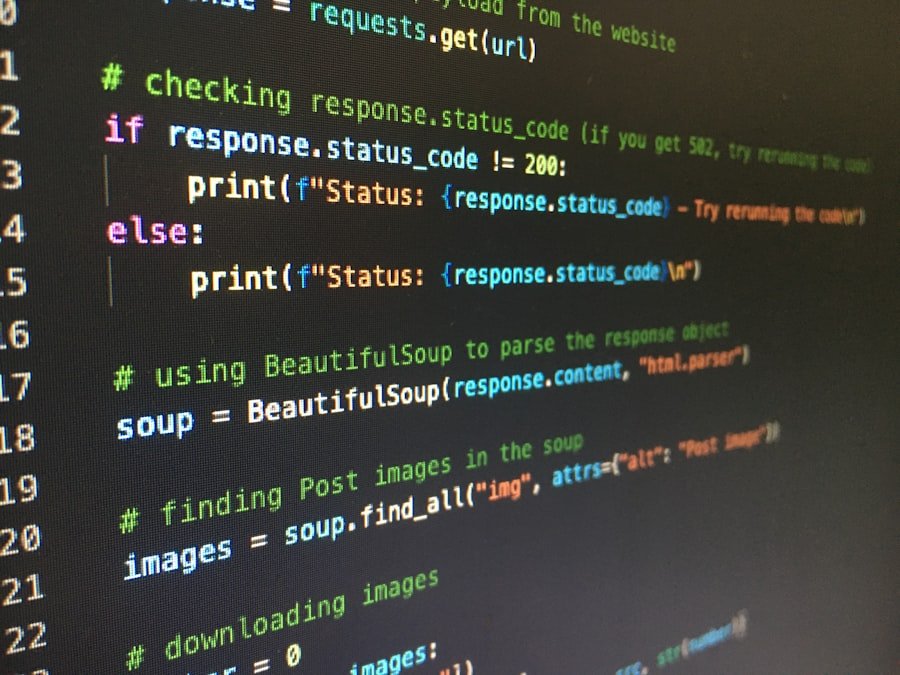
For example, writing a script that scrapes data from websites using libraries like Beautiful Soup or Scrapy can save hours of manual work while providing up-to-date information for analysis or reporting purposes. In the realm of machine learning, developing predictive models based on historical data can lead to impactful applications in industries such as healthcare or finance. For instance, building a model that predicts patient outcomes based on historical medical records could assist healthcare professionals in making informed decisions about treatment plans.
By engaging in these projects and applying Python’s capabilities in practical scenarios, developers not only solidify their understanding of the language but also contribute meaningfully to their respective fields through innovative solutions.
FAQs
What are the best online platforms to learn Python as a beginner?
Some of the best online platforms for beginners learning Python include Coursera, Udemy, edX, Codecademy, and Khan Academy. These platforms offer structured courses with video lectures, exercises, and projects.
Do I need any prior programming experience to start learning Python?
No prior programming experience is required to start learning Python. Many beginner courses are designed specifically for individuals with no coding background.
How long does it typically take to learn Python as a beginner?
The time to learn Python varies depending on the learner’s pace and course intensity. Generally, beginners can grasp the basics within 6 to 12 weeks with consistent study.
Are free Python courses effective for beginners?
Yes, many free Python courses provide quality instruction suitable for beginners. However, paid courses may offer more comprehensive content, projects, and instructor support.
What topics are usually covered in beginner Python courses?
Beginner Python courses typically cover fundamentals such as variables, data types, control structures (loops and conditionals), functions, basic data structures (lists, dictionaries), and simple file handling.
Can I get a certificate after completing an online Python course?
Many online platforms offer certificates upon course completion, especially for paid courses. Certificates can be useful for showcasing your skills to employers.
Is it better to learn Python through video lectures or interactive coding exercises?
A combination of both video lectures and interactive coding exercises is ideal. Video lectures explain concepts, while exercises provide hands-on practice to reinforce learning.
What are some tips for beginners to effectively learn Python online?
Tips include practicing coding regularly, working on small projects, participating in coding communities, asking questions when stuck, and reviewing course materials multiple times.
Can I use online Python courses to prepare for a programming job?
Yes, online Python courses can help build foundational skills needed for programming jobs. However, gaining practical experience through projects and additional learning is also important.
Are there any prerequisites for enrolling in beginner Python courses?
Most beginner Python courses have no prerequisites. Basic computer literacy and internet access are usually sufficient to get started.
About the Author